Posts

Showing posts with the label Tips and Tricks

Enabling Powerlines in your Visual Studio Terminal

Image
I've been a fan of Windows Terminal since day one and have configured my terminal to include git information as well as the clock.  This is well document by many people including Scott Hanselman .  Over the last 2 weeks I've started playing with using Terminal within Visual Studio that is itself powered by Windows Terminal, you can tell I've used Visual Studio Code a lot recently and I like the integrated terminal, its convenient to have it open in the repo's directory, especially handy for testing build scripts. However, the default experience (for me at least) wasn't a great. I had setup my Visual Studio terminal as the following: Developer PowerShell, Developer Command Prompt (although I never use this and should probably kill it!) and then my 2 Ubuntu environments. Great, my terminal dropdown in VS lists everything nicely:  However.... It's imported my environment settings (which is great) but the default font is missing powerlines so everything is borke...
DotNet CLI , private NuGet feeds and Linux...

Today I hit an issue whilst trying to run dotnet run for some of our benchmarkdotnet tests which I like to run all new hardware I try out. My pair of Raspberry PI 4's arrived and I wanted to compare the performance of our Fingerprint capture code. I've hit the issue before and last time I figured it out I swore I'd blog and write it up as I knew I would forget! My benchmark project is a straight forward BenchmarkDotNet project however it consumers NuGet packages from both nuget.org as well as our private NuGet repository which requires authentication. For all of our windows machines this works without an issue for machines on the domain they authenticate seemlessly however when using Linux devices this is a different issue :( Instead on Linux devices we always get: /home/pi/dotnet/sdk/2.2.300/NuGet.targets(121,5): error :   GSSAPI operation failed with error - An invalid status code was supplied (SPNEGO cannot find mechanisms to negotiate). This essentially means it ...

x86 .Net Core application fails to launch and debug via Visual Studio 2017

Today I had a random issue following changing one of my .Net Core projects. Usually I run these AnyCPU but this one needed to be X86 due to a third party library. I've done this before and had no issues but today VS seemed to launch the app and then immediately quit with an error exit code but no useful information! So far whenever I hit something like this I always try and run it via the console using dotnet run in the project directory. Fortunately this showed the issue straight away: It was not possible to find any compatible framework version The specified framework 'Microsoft.NETCore.App', version '2.1.5' was not found.   - Check application dependencies and target a framework version installed at:       C:\Program Files (x86)\dotnet\   - Installing .NET Core prerequisites might help resolve this problem:       http://go.microsoft.com/fwlink/?LinkID=798306&clcid=0x409   - The .NET Core framework and SDK can be installed from: ...

a different day a different msbuild issue...

Image
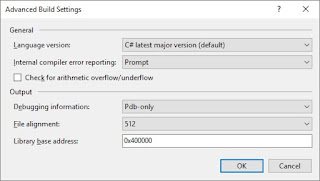
Recently I started working on a small tweak to an existing web project, its a small internal dashboard sort of thing nothing complicated about it. However after I started working on it I found I could no longer build the project it came up with: ): error CS1525: Invalid expression term 'throw' ): error CS1002: ; expected  error CS1043: { or ; expected  error CS1513: } expected : error CS1014: A get or set accessor expected : error CS1513: } expected  When I looked at the location of the build errors I could see some perfectly valid code, all be it C#7:  public IEnumerable<AttemptResult> Attempts { get => _attempts; set => _attempts = (value ?? Enumerable.Empty<AttemptResult>()); } Why would it not like the C#7 code, i'm in VS2017 it should all be correct, when I double checked the language setting under Advanced Build Settings it correctly had C# latest major version, so it wasn't a case the project had got pinned to a lan...

project.json doesn't have a runtimes section, add '“runtimes”: { “win”: { } }' to project.json within a .Net Class Library

Recently I've started experiencing weird build errors when switch branches on a product. Error : Your project.json doesn't have a runtimes section. You should add '"runtimes": { "win": { } }' to your project.json and then re-run NuGet restore. It's a weird sounding error and the fact it mentions project.json makes it sound like a hangup from when .Net Core and Standard were using project.json files before they became .csproj files again. My first thought to resolve this is always try a clean and build, particularity when swapping branches things could get left hanging around but this doesn't work. I took a closer look at the projects affected and the cause is to do with one of the branches of our product. It's an early development branch of a new feature where the project has become .Net Standard 2.0 but also targets .Net 4.5, where as the support and main dev branch are still the full framework class libraries.  The cause is mos...

The curious case of hidden form fields changing their value....

So today I was looking into an odd issue our CEO experienced using a website. He would get a password reset email and upon following the link and entering a new password it would fail to change with a cryptic message. I said I'd have a quick look and see what I could see. I signed up and triggered a password reset and found no issue. I was using Chrome and assumed he had but it turns out he was using Safari on his Mac not Chrome. So I loaded up Safari on my Mac and used my link to again find no issue. To be thorough I asked him to send me his link, in Chrome no issue however this time in Safari I hit the issue. My first thought led me to then check what was posted to the server and sure enough in Chrome I could see an encoded access token sent but in Safari I saw my email address sent. I tried this on my CEO's machine and his machine posted his email address, it looked like Safari was autofilling hidden form fields as well as visible ones! This is crazy! So I performed ...

GZip Compression of JSON and IIS

Image
Recently in work we've been monitoring the data usage of one of our main products. In today's modern age as developers we often think of bandwidth as cheap and usually have nice fast internet connections and don't overly worry about the *bloat* of our pages and applications. Our application is often used on 4G connections and whilst they are fast and performance of the application is overall acceptable we found that its data usage was higher than expected and caused us a few concerns over the amount of GB consumed per month. We've benefited from GZip compression for many years now and most people don't even think about whether its enabled or running as well as it should be. Turning it on and off is usually as simple as turning on the feature in Server Manager and then enabling Static Compression (for your static files, CSS, Javascript etc) and then enabling Dynamic Compression for the generated HTML etc. So it was assumed all was well. As I'm paranoid abou...

ADO.Net Async with Transactions... A Lesson Learned

Image
Last night I was testing out a new WebApi Filter I've added to a project, its fairly simple, log some data that comes from a HTTP header to the DB. This particular project has no Entity Framework or anything, just simple ADO.Net, in fact I think the project has 3 stored proc's in total. I tend to Async all the things by default so when I originally wrote my DB code I had: using (var conn = new SqlConnection(_connectionString)) {      await conn.OpenAsync();      using (var transaction = conn.BeginTransaction())      {           var command = conn.CreateCommand();           command.CommandText = "[Api].[LogDeviceRequest]";           command.CommandType = System.Data.CommandType.StoredProcedure;           command.Transaction = transaction;           command.Parameters.AddWithValue(//etc     ...

Its the little things...

In the history of C# we have been spoiled by every version having excellent new language features in. We had Generics, Linq, Tasks, async/await which were massive hitters and transformed the way we worked and wrote code. C#7 however I found has given us lots of little improvements that make things smoother and easier which has been great. One feature I hadn't really used yet though was the new Pattern Matching , this wasn't because I hadn't wanted to but more I hadn't seen a time to really use it. That was until tonight. A year or so ago I had a scenario where I had to take a base type and then1 return the appropiate mobile view to render. Prior to Pattern Matching I ended up with something like: if (value is HoldingPage) return new LoadingView(); } var listingPage = value as ListingPage; if (listingPage != null) { return new ListingView(listingPage); } Tonight I needed to add a new view into this code and decided it needed tidying up. Pattern Matching...

Fixing a Quirky "Xamarin.Forms ListView Bug" That Led Me Back to Basics And How Most Bugs Are Written By Users!

Image
For the last two evenings I've been chasing what seemed a random bug. The crux of it came down to scrolling large lists within a ListView, 1000's of items, which were grouped, would muddle up the items and often duplicate an item a couple of times. An example output: First page of results: Test 1 Test 2 Test 3 Test 4 Test 5 Test 6 Test 7 Test 8 Test 9 Test 10 Test 11 Test 12 The second page would then render: Test 13 Test 14 Test 1 Test 15 Test 16 Test 4 Test 17 Test 18 Test 19 Test 20 Test 6 At first glance this looked like a random error. I considered that maybe my list parsing code (the app takes HTML and makes in easier to use) but my unit tests checked out. So I went over these again with a toothcomb. All checked out. Next I considered the code that grouped the items, again unit tests all good, toothcomb said still good. So I sat pondering. Was there something similar about all of the duplicated items. There was, they were all items that...

Xamarin iOS for Simulator and Screenshots

Image
I love the Xamarin iOS Simulator for Windows , much easier than VNC'n to my Mac or having to constantly use my iPhone when I'm only playing around with UI and stuff. It has all the features you'd expect like show/hide keyboard, home button, rotate, trigger call etc. It also has capture screenshot which would be super handy. Tonight I needed to take a few screenshots so got trigger happy with the screenshot button but.... I couldn't find where they went! To cut a long story short I ended up using Process Monitor to find where the files were being written and it turns out they go to a Xamarin\iOS Simulator folder within your pictures folder. I never use mine on my development machine so didn't even consider checking there. So two tip Pro Tips: Xamarin iOS Simulator for Windows Screenshots goto: C:\Users\{username}\Xamarin\iOS Simulator Not sure where files are or whats using them... Don't forget about Process Monitor

Experiences from using existing projects within VS2015

I've been using VS2015 since an early preview at home but now it's launched I've been trialling it with many of our solutions within work trying to iron out any associated pain before we upgrade every developer (that hasn't already ;)). One thing I've noticed across a few of our web projects that's caught a few people out is an issue with the new version of IIS Express, and actually if we ever got to deploying to IIS 10. For many of our web projects we have added additional mimeTypes via the web.config to allow IIS to serve up woff2 files, previously you would have done this via:  <system.webServer>     <staticContent>         <mimeMap fileExtension=".woff2"mimeType="application/font-woff2" />      </staticContent>  </system.webServer> However IIS 10, and therefore IIS Express 10, now handles this mimeType automatically. When you run your existing projects via VS2015 you will find all of your we...

Deploying Non Project Files with Web Deploy

Deploying Websites and Web Applications has changed massively over the years, I have seen the likes of FTP, Copy & Paste over RDP (why!!) etc but there has always been a degree of, did I copy the correct files, did I miss any, did I upload the correct client config etc. Since VS2010 I have been a big fan of always publishing my applications to either a local folder and then upload or directly to the server, depending on the setup. One thing I have always struggled with is publishing files that aren't part of my project, and ensuring the correct client config settings are uploaded. Now I'm running VS2012 full time I decided it was time to put to bed these issues and ensure I could use one click, or as near to one as possible, to deploy stage configurations of my applications as well as live. VS2012 has tweaked publishing again, it now includes a much fuller publish model, with WebDeploy amongst the usual FTP, FileSystem etc. The Package / Publish process is just an ext...

Troubleshooting NuGet failing to load

Today I had the unfortunate circumstance for VS2010 to crash whilst I was working, nothing to big I thought, I've had this happen before. I reopened VS went to open my solution and got the following message: --------------------------- Microsoft Visual Studio --------------------------- The 'NuGet.Tools.NuGetPackage, NuGet.Tools, Version=1.6.21215.9133, Culture=neutral, PublicKeyToken=b03f5f7f11d50a3a' package did not load correctly. EEK! Nuget is smegged :( I immediately thought to uninstall the extension and then reinstall it, same thing happened :( I then, (looking back this was foolish as NuGet is shared), thought I know I just load it in VS11 that will work, it also errored. Not cool, the error message however directs you to start VS with logging enabled by using the /log command argument and then to look at the activity log.  The activity log is located in your appdata roaming folder, simply stick %appdata%\Microsoft\VisualStudio\10.0\ActivityLog.xml in...

DotNetOpenAuth 4 beta with Windows Azure

Recently I blogged about using DotNetOpenAuth , I got it working within my local MVC3 Web Application after fixing the dependency issue however when I came to put it into Windows Azure I was getting a random error when the compute emulator started up. --------------------------- Microsoft Visual Studio --------------------------- Windows Azure Tools for Microsoft Visual Studio There was an error attaching the debugger to the IIS worker process for URL 'http://127.255.0.0:82/' for role instance 'deployment16(174).xxxxxxxxxxx_IN_0'. Unable to start debugging on the web server. See help for common configuration errors. Running the web page outside of the debugger may provide further information. Make sure the server is operating correctly. Verify there are no syntax errors in web.config by doing a Debug.Start Without Debugging. You may also want to refer to the ASP.NET and ATL Server debugging topic in the online documentation. Nice! How confusing, the...

Using DeferredLoadListBox in a Pivot Control

Recently I've been using the DeferredLoadListBox It's a fantastic way of improving the performance of your list views. I started using the DeferredLoadListBox within a Pivot control but occasionally found that the app would randomly crash throwing the following exception: All containers must have a Height set (ex: via ItemContainerStyle), though the heights need not all need to be the same. This usually means you haven't set the properly. However I had ensured I had set the style height. I then got the source and started poking around. What I found was although in the UnmaskItemContent method the container had a height if you inspected the ActualHeight property this was 0. I did a bit of research and found the following on MSDN: ActualWidth and ActualHeight are calculated based on the Width/Height property values and the layout system. There is no guarantee as to when these values will be "calculated" So the problem appeared to be with timing. After contactin...

Windows Phone 7: Security Exception on deactivate

This morning I have been finishing the tombstoning part of one of my Windows Phone applications I have been developing. Whilst testing I found that when the application deactivated or terminated that a SecurityException was thrown. Looking at the stack trace I noticed that it was occurring whilst trying to serialise some data to the Applications State store. Now I knew I was putting some data into state so this wasn't to hard to find however, when I looked at what I was putting into state it was nothing more complicated than a custom type that exposed a collection of POCO classes. Why would this cause a security exception. I decided to do a simple Google search for the exception "windows phone 7 security exception" and the second result looked similar: "c# - SecurityException was unhandled when using isolated storage" [ http://stackoverflow.com/questions/4209280/securityexception-was-unhandled-when-using-isolated-storage ]. So I had a look, and guessed that if y...

Wasting Bandwidth One Image at a Time....

Content Management Systems are great, they allow the average Joe to have a great level of control over their website. Gone are the days of clients asking for static pages to be amended, we live in the database powered give the power of editing and updating content to the client Our clients get to use Rich Text Editors like FCKEditor. They look and feel just like Microsoft Word, they can play with text, upload images, resize them simply by dragging them and are very often really happy. However this often comes at a cost. Most RTE's by default simply resize images by sticking on the HTML img attributes height and width. As many people are aware this doesn't actually resize the image, it just simply tells the browser take this massive image and render it smaller. The end user still has to download the huge image, I have seen on some sites 2000px x 1200px images being downloaded and then only shown at 250px x 120px!, which can take a while to load dependant their internet connectio...

Google SiteMap Generator + Input validation failed Error

Since Google release their Google Site Map Generator I have been using it on my web server for the sites that I manage. Setting it up and getting it running was fine and I haven't had a problem, that was until this week. This week I noticed that as I was only letting the generator update the sitemap from actual URL hits quite often a few of my sites aren't hit for a day at a time which was resulting in empty sitemaps. This then causes Google WebMaster Tools to whinge at you which isn't a good thing. So I decided to update my settings to include parsing my IIS Log Files in the hope it would use previous days ones and not generate blank files. This is where I hit a road block. When ever I changed a setting and clicked save the generator would be really useful and tell me that "Input Validation Failed" and to basically sort myself out. I was confused to say the least as everything was fine, no field was highlighted as being erroneous so I ended up giving up and leav...

MVC Snippets: must be a reference type in order to use it as parameter 'TModel' in the generic type or method 'System.Web.Mvc.ViewUserControl'

Recently I have been playing with ASP.NET MVC , in particular I have been building myself a new website. I thought it might be good to post any peculiar things / lessons I learn during this build. Tonight I stumbled across one of these lessons. When you strongly type a view or partial view the type must be a reference type. Otherwise this means you get a HttpCompilation Error: "your data type" must be a reference type in order to use it as parameter 'TModel' in the generic type or method 'System.Web.Mvc.ViewUserControl '. Initially I couldn't figure out what this meant as I was passing my type through, it existed etc. However it was then I realised I had declared my type as a struct not a class. If you are unsure of the difference between a class and a struct I recommend looking it up, the gist of it is that a class is a reference type and a struct isn't. As a struct isn't a reference type you can save memory due to it not having to allocate additi...