Posts

Lessons Learnt: Migrating From Net Framework to Net Core - Net Standard Libraries and Multi-Targeting
Image
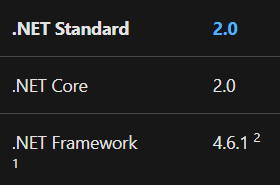
One of the first lessons I'm going to share from our recent migration happened very early on in the project but continually popped up as we went along and updating each service. I've always been a fan of code reuse and sharing code within our solutions however I don't like everything being used from one location. I like to modularlise and componentise any shared code. To date this has always been via Class Libraries and Portable Class Libraries when these were shared with Mobile Applications built with Xamarin as well. I've always versioned these and published via an internal Nuget server to reduce the risk when changes are made and to enforce decoupling. My migration strategy to .Net Core (we chose 2.1 originally) stipulated that we should be fully backwards compatible; this meant that every library that we needed to use had to ideallly continue to work in all other referenced projects. Ideally I wanted to just update all of our class libraries to .Net Standard 2.0...

Lessons Learnt: Migrating From Net Framework to Net Core - Part 1 Introduction

I'm nearing the end of a major project in my work. Taking a number of our essential services running on IoT devices and porting them from running on Windows x64 over to Linux Arm; whilst still maintaining backwards compatability and still running these services on the existing Windows devices. This may sound like a daunting and major undertaking but actually it hasn't been too bad, it's very possible and the benefits of doing this, for us at least, are significant. What I want to do over my next couple of blog posts is to highlight lessons I learnt during the process, thing's I wish I hadn't done / wish I had known before I started as well as any other things to takeaway from this. As this will form a mini series of posts I'll keep a list of all posts updated below and maintain this on subsequent posts. Lessons Learnt Net Standard Libraries and Multi-Targeting Multi-Targeting Class Libraries #ifdefs Conditional NuGet's Muti-Target your Unit Test...

x86 .Net Core application fails to launch and debug via Visual Studio 2017

Today I had a random issue following changing one of my .Net Core projects. Usually I run these AnyCPU but this one needed to be X86 due to a third party library. I've done this before and had no issues but today VS seemed to launch the app and then immediately quit with an error exit code but no useful information! So far whenever I hit something like this I always try and run it via the console using dotnet run in the project directory. Fortunately this showed the issue straight away: It was not possible to find any compatible framework version The specified framework 'Microsoft.NETCore.App', version '2.1.5' was not found.   - Check application dependencies and target a framework version installed at:       C:\Program Files (x86)\dotnet\   - Installing .NET Core prerequisites might help resolve this problem:       http://go.microsoft.com/fwlink/?LinkID=798306&clcid=0x409   - The .NET Core framework and SDK can be installed from: ...

The mysterious case of being unable to debug a .Net Core Console application using Visual Studio 2017

Image
This morning I had a very frustrating time. It started off well and I was continuing my drive to convert alot of our hardware services from .Net Framework over to .Net Core. Phase 1 is simply .Net Core running on Windows but then Phase 2 is true cross platform. To date its gone very well and I'll probably write about it further another time. This morning I was continuing to port code across, mainly making our libraries .Net Standard 2 or .Net Standard 2.0 with .Net 4.5 multi targeting. All worked fine until I converted my final library. The app built, it ran and seemed to be working fine however all of a sudden none of my breakpoints in Visual Studio worked. During this entire process I have found I've hit many build / compile issues when switching between branches and have often had to nuke my obj folders or do a git clean -xdf but this was not the case. Everything worked bar the breakpoints. The usual tricks didn't work, I even reboot my machine and then checked out t...

UWP WebView Intermittently Fails to Load in a Xamarin.Forms App - Resolved!

As I've previously mentioned I've been porting an existing Xamarin.Forms app over to UWP and tonight I've had to tackle an annoying bug which was quite difficult to overcome and I thought worthwhile sharing. The bug occurs when loading WebViews with HTML directly rather than a URL. I found that roughly 1 in 5 page loads ended up a blank page being rendered. As this is now the third platform for the App I was fairly confident the html and everything was correct. First of all I suspected a layout issue and maybe the width/height was being messed up so I added a background colour to the control but this always rendered. So not a layout issue. A quick Google led me to Johan Karlsson's post on events needing to be added on the main UI Thread  this seemed better at first but i ended up still hitting the issue 1 in 10 page loads.  More googling led me to a Xamarin bug with the issue  but no resolution :( Taylor Buchanan comments on the bug with a work around howeve...

Auto Collapsing Master Panel inside Xamarin.Forms UWP app.

Recently I've been migrating a Xamarin.Forms application which works on phones and tablets over to UWP so that its compatible with Windows 10 and available on the desktop. Most things have ported well and after a few tweaks most things are running. However during testing I noticed something odd. I use a master detail page to provide a navigation pane and then a details pane. On phones the navigation page is shown and hidden as expected. On tablets if landscape the menu is always open and if portrait it pops up over the details. Now on UWP it behaves as the tablet however I also expected if the window became small or docked to the side of the screen the menu would again turn into a pop over, but Xamarin.Forms doesn't support this by default. It is however quite easy to support this via a custom renderer. We can override the elements size changed and determine the size of the element. If the size is less than the minimum we want the menu to be automatically opened for we can ...

An unexpected exception which resulted in a gentle reminder of how Linq works...

Image
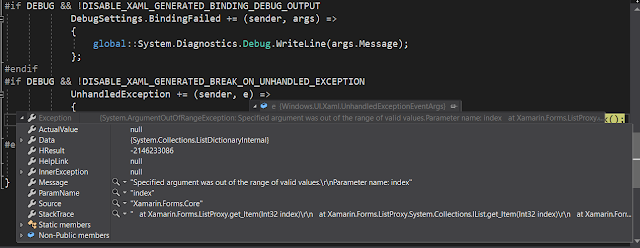
Tonight I spent some time continuing my port of a Mobile Application I developed a few years ago over to UWP. As it was built in Xamarin.Forms , which also supports UWP, so far its been a fairly straight forward process. During testing tonight however I kept getting an uncaught exception every time I tapped a list item. Specified argument was out of the range of valid values - Source Xamarin.Forms.Core Nasty Exception Now first I double checked the code and found UWP, iOS and Android all run the same code and nothing had changed, so I hadn't accidentally broken anything. What I did note was the pages that didn't have grouped list items worked fine, where as grouped lists always crashed. This lead me to take a look at my ItemSource code for the listview. My ListView ItemSource Now those observant might notice in the pic I'm inspecting the listingNavigationItems, and like I might have realised the potential issue. Dependent on whether grouping is enabled I eith...