Posts

Xamarin iOS for Simulator and Screenshots

Image
I love the Xamarin iOS Simulator for Windows , much easier than VNC'n to my Mac or having to constantly use my iPhone when I'm only playing around with UI and stuff. It has all the features you'd expect like show/hide keyboard, home button, rotate, trigger call etc. It also has capture screenshot which would be super handy. Tonight I needed to take a few screenshots so got trigger happy with the screenshot button but.... I couldn't find where they went! To cut a long story short I ended up using Process Monitor to find where the files were being written and it turns out they go to a Xamarin\iOS Simulator folder within your pictures folder. I never use mine on my development machine so didn't even consider checking there. So two tip Pro Tips: Xamarin iOS Simulator for Windows Screenshots goto: C:\Users\{username}\Xamarin\iOS Simulator Not sure where files are or whats using them... Don't forget about Process Monitor

HTML 5 Web Capture Quirks

Image
Today I've been playing around with HTML 5 Web Camera capture and for the most part its been quite easy. HTML5Rocks has a good intro post  which covers many things. Now it came to testing and everything worked as expected in Chrome and Firefox however in Microsoft Edge (We all test in MS Edge don't we.... ) I found an odd behavior.  I'm being quite lazy and wanting a 640 x 480px image, so 4:3 aspect ratio which I then take a smaller portion from. Below is what it looks like in Chrome: However in Edge I was getting: Originally my source was just: navigator.getUserMedia({video:true}, (stream) => { So I decided to add explicit constraints: var constraints = { video: { width: 640, height: 480, } }; navigator.getUserMedia(constraints, (stream) => { However the results were still the same. I then started digging around any Edge documentation I could fin...

Experiences from using existing projects within VS2015

I've been using VS2015 since an early preview at home but now it's launched I've been trialling it with many of our solutions within work trying to iron out any associated pain before we upgrade every developer (that hasn't already ;)). One thing I've noticed across a few of our web projects that's caught a few people out is an issue with the new version of IIS Express, and actually if we ever got to deploying to IIS 10. For many of our web projects we have added additional mimeTypes via the web.config to allow IIS to serve up woff2 files, previously you would have done this via:  <system.webServer>     <staticContent>         <mimeMap fileExtension=".woff2"mimeType="application/font-woff2" />      </staticContent>  </system.webServer> However IIS 10, and therefore IIS Express 10, now handles this mimeType automatically. When you run your existing projects via VS2015 you will find all of your we...

Developing a Microsoft Band App Using Windows Universal Apps i.e Windows 10

Last week I finally picked myself up a Microsoft Band and instantly started thinking about potential app ideas and that's where they were left, as thoughts :) However unfortunately I also got knocked off my bike last week and ended up with a fractured elbow (at least this is all it was). Today I finally got my sling off and have been given a ton of Physio exercises so I can actually get my arm moving properly again, at the moment it sucks. These Physio exercises have to be done every hour in order to ensure I regain full mobility of my arm but it's kind of a drag to remember. I started by simply using the Band's Countdown App to remind me to do these, but whilst traveling this afternoon I thought of writing an App that not only reminded me to do these exercises but also logged and could display how many iterations of the exercises I performed and how fast etc. Needless to say tonight I started playing with the Band SDK and decided to start a series of blog posts that outlin...

My Favourite Visual Studio Features #myVSUK

Image
It's been really interesting to read some of people's submissions for the Visual Studio Features competition. Quite varied. I thought I'd add my top 5 into the mix, although I've probably missed the deadline :) 1 - Test Explorer Test Explorer, Docked Left in my Main Window I really love having Test Explorer baked in, especially when the XUnit runner is installed. Previously I used to use ReSharper's test manager but now I pretty much only use this. The addition of playlists in VS2013 has also helped. You can run tests automatically after build, search your tests and group in various ways. One of my most used features. 2 -  Navigate To or as I say Ctrl + T Finding those Test Types are now just one Key Combo away :) This is another feature I used to use Resharper extensively for, the ability to quickly find a type by name. Just hit Ctrl+, start typing, instant win :) 3 - Server Explorer with Azure Integration Managing and Viewing Azure Serv...

The importance of all-age user testing and the UIButton Touch Area

Image
Of late I have been getting various users to try out an iOS app I have been building using Xamarin.iOS, and I got some interesting feedback which I thought I'd share. The app runs on iPod Touch's / iPhone's so a common platform. One of the areas people commented on was Ease of Use. Interestingly most people commented that the app felt natural and looked easy to use, however about 30% of my responses contained "I struggled to accurately tap the response icons", "I kept missing the buttons and began to get frustrated", "Wearing gloves seemed to make it harder to tap the icons". My first response to this was "really?", The icons by my standards were fairly large and didn't look too small, in fact I deliberately made them slightly larger than Apple's recommended 44x44 [ref: http://stackoverflow.com/questions/1928991/minimum-sensible-button-size-on-iphone ] So I found out more information from the affected users. Turns out ...

Using LinqPad to replace my "test" console applications

Image
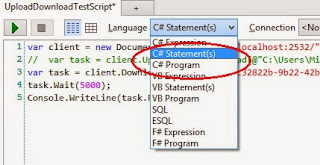
I've used LinqPad since... well forever :) I've had the free version since the early days and then paid for the full thing when I started out on my own a few years ago. At the beginning I was mainly using it for quick testing DB queries and quick idea jottings without thinking about big architectures etc, basically a scratchpad , and it's always worked well for me. Even more so after I started using it to connect to Azure using the Azure Table Storage driver. Another thing I have always done, even when I have lots of unit tests, is to often have a console app in most of my API projects. Be this WebApi or older ones using MVC or WCF. These exist to test the client libraries for the API's that I have written which integration easier. These console apps mainly have a few methods that allow me to easily and quickly try out my service api's. Be this querying, uploading / downloading files etc. These console apps aren't instead of unit tests or integration test...